SpeedyApply Review 2026: $19/mo Autofill, 3 ATS Tested
SpeedyApply costs $19 a month. In 25 apps, Greenhouse filled cleanly, Lever mostly worked and Workday failed on multi-step forms. SpeedyApply vs Sniper.
SpeedyApply is a good autofill extension if most of your applications go through Greenhouse, and a less reliable one if they go through Workday. In our 25 applications across three ATS platforms, it filled Greenhouse forms cleanly, mostly handled Lever, and failed on Workday multi-step forms. The premium plan cost $19 a month when we tested it, and it makes sense when filling a form faster is your bottleneck; if you would rather not fill the form at all, Scoutify's Sniper applies on the employer's career site for you.
This SpeedyApply review covers what the speedy apply extension does today, what our test showed, how its local storage works, what it costs, and how it compares with an auto-apply tool. I built Scoutify, which makes Sniper, so please weigh my opinion with that in mind.
What SpeedyApply Does
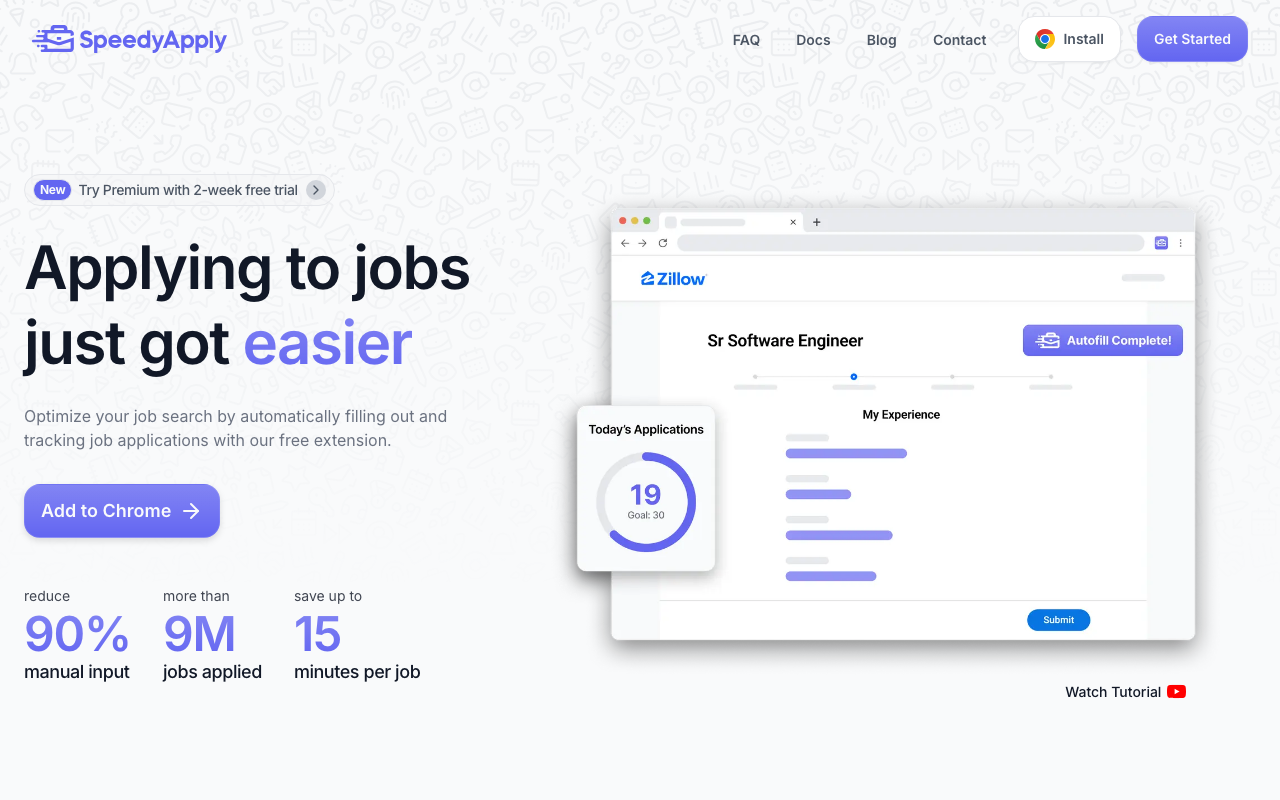
SpeedyApply is a browser extension that detects an application page and fills the whole form with one click from a profile you build once. It started as a tool focused on Workday and Greenhouse, and as of September 30, 2026, its homepage says it works on more than 25 ATS platforms, supports more than 40,000 job seekers, and has been used for more than 18 million applications. Those figures come from SpeedyApply, and we could not check them ourselves.
The extension also logs every application you submit through it, with the company, title, date and link, and a small dashboard shows your application volume by week. SpeedyApply now advertises a job list of more than 1 million postings and a premium feature called Auto Pilot, which it describes as complete automation that fills and submits applications from start to finish. We tested the autofill rather than Auto Pilot, so this review does not rate Auto Pilot.
Why Workday and Greenhouse matter
Workday and Greenhouse are two of the most common applicant tracking systems in tech hiring. Workday dominates large enterprises such as Amazon, Salesforce and Deloitte, and Greenhouse is the standard for growth-stage tech companies such as Airbnb, Coinbase, Discord and HubSpot. If your search targets those kinds of employers, a large share of your applications will run through one of the two, which is why SpeedyApply built its reputation there. Workday is also the system Sniper applies through most often, because so many large employers use it, and our Workday integration page explains how that works.
What Our 25 Applications Showed
We ran 25 applications through SpeedyApply on three systems. Greenhouse was the clear success, because its forms are consistent from one employer to the next, so the name, email, phone, resume upload, LinkedIn URL and work authorization fields filled reliably. Lever mostly worked, with a few fields to fix by hand. Workday was where it failed: basic fields such as name, email and phone filled, but multi-step forms, dropdown menus and custom questions that vary by employer needed manual work.
The Workday result is not a unique failing of SpeedyApply. Each company customizes its Workday setup, with different field names, page orders and required questions, so even a tool built for Workday will need corrections on heavily customized tenants.
Setting Up Your Profile and Saved Responses
Setup asks for your personal information, work history, education and saved answers to common questions, and it takes about 10 to 15 minutes, as it does with most autofill tools. The saved responses are the most useful part. You can store answers about salary expectations, visa status, start date and your experience, and SpeedyApply pulls them in when it sees a similar question. Premium adds multiple profiles for different kinds of roles, profile scoring that suggests the best fit for a job, and generated answers to application questions.
Application Tracking
The built-in tracker is a nice feature that many autofill extensions lack. Every application you submit through SpeedyApply is logged automatically, so you get a running record without a spreadsheet. It is basic next to a dedicated tracker such as Huntr or Teal, but it is convenient to have it inside the tool you already use.
Privacy and Local Data Storage
SpeedyApply says your data is stored locally in your computer and Chrome browser and is not stored on any external servers. That is a real privacy advantage, because your profile and history stay on your machine. The trade-off is that nothing syncs across devices, so you set up a separate profile on each computer, and clearing your browser data can wipe your profile and history unless you export it first. Some users have reported losing their data after browser or extension updates, so I would export it regularly.
Limitations to Know Before You Rely on It
- Workday accuracy varies by employer. The core experience on standard setups is solid, but heavily customized Workday tenants can need a lot of manual work.
- Platform support is narrower than the biggest extensions. SpeedyApply now lists 25+ systems, while Simplify claims 100,000+ career sites, so a broader extension may still be needed for unusual portals.
- Local storage can lose your data. A cleared cache or a bad update can remove your profile, and the export function only helps if you remember to use it.
- It is built for Chrome first. A Firefox add-on also exists, but Safari users will need another browser.
For a broader view of the extensions in this category, see our roundup of the best autofill tools for job applications.
SpeedyApply Pricing
The base extension is free. Premium adds Auto Pilot, multiple profiles, profile scoring and generated answers, and it comes with a 3-day free trial. The premium plan cost $19 a month when we tested it, and as of September 30, 2026, SpeedyApply does not list a price on its homepage, so check the price in the extension before the trial ends.
When Filling a Form Faster Is Enough, and When Not Filling It Is Better
An autofill extension makes the form faster, but it does not change when you get to the form. If you apply to a few hand-picked jobs a week, read every posting carefully and want to write each open-ended answer yourself, filling the form faster is enough, and SpeedyApply or Simplify will save you real time.
Not having to fill the form at all is better when you apply to the same kind of role every week and you want to be among the first applicants. The job that posts at 6 AM on a Workday career site does not wait for you to finish your commute, and most of the time you spend applying is not the typing but the finding, opening and checking. That is the gap Sniper closes, and our guide to autofill vs auto-apply explains the difference in more detail.
SpeedyApply vs Sniper
| Feature | SpeedyApply | Scoutify Sniper |
|---|---|---|
| Who finds the job | You do | Scoutify, from 70,000+ career pages |
| Who submits | You do, unless you turn on Auto Pilot | Sniper does, one application per posting |
| How soon after posting | Whenever you open the form | Usually minutes after a matching job posts |
| Where it applies | 25+ ATS platforms, by its own count | Workday, Greenhouse and SmartRecruiters; Ashby and Lever rolling out |
| Proof it arrived | Its own application log | The employer's confirmation email, filed in Scoutify Mail |
| Price | Free extension; premium was $19 a month when we tested it | $25 a week for up to 500 applications; first 25 free |
Sniper watches the career pages, and when a new job that fits your roles, locations and visa needs appears on a supported site, it fills in the employer's real application with your resume and submits it, including while you sleep. It never logs in to your LinkedIn account. Most employers send a confirmation email (68% of Sniper applications get one, with a median of 1.2 minutes after submitting), and those confirmations and any replies land in Scoutify Mail. SpeedyApply still has a place for the portals Sniper does not cover, and many people keep an autofill extension installed for exactly those.
Frequently Asked Questions
Does SpeedyApply work on Workday?
SpeedyApply fills basic Workday fields such as name, email and phone, but in our test it struggled with multi-step forms, dropdown menus and custom questions that vary by employer. It worked best on Greenhouse.
How much does SpeedyApply cost?
The SpeedyApply extension is free, and Premium comes with a 3-day free trial. The premium plan cost $19 a month when we tested it, and as of September 30, 2026, SpeedyApply does not list the price on its homepage.
Is SpeedyApply better than Simplify?
Both have trade-offs. Simplify has broader coverage and free autofill, while SpeedyApply stores your data locally and was strong on Greenhouse in our test, and neither one handles every Workday form well.
Does SpeedyApply submit applications for you?
The free extension fills the form, and you press submit. SpeedyApply's premium Auto Pilot feature says it fills and submits applications, but we did not test it, and it does not watch career pages for new postings the way Scoutify's Sniper does.
Is the SpeedyApply extension safe?
SpeedyApply says it stores your data locally in your browser rather than on its servers, which limits what it holds about you. The main risk is losing your profile if your browser data is cleared, so you should export it regularly.
The Bottom Line
SpeedyApply is a solid tool with a clear strength: fast autofill on Greenhouse, with reasonable Lever support and a built-in tracker. Its local storage is a genuine privacy advantage, and its Workday handling is where you should expect to fix things by hand.
If filling forms faster is what you need, it is worth the trial. If you would rather stop filling forms and have new matching jobs applied to minutes after they post, try Sniper, Scoutify's AI auto apply; your first 25 applications are free with no card. Our list of the best auto-apply tools compares it with the other options.
Related Reviews and Guides
- Our Simplify Copilot review covers the free autofill extension SpeedyApply is most often compared with.
- Our guide on whether AI can apply to jobs for you explains what auto-apply tools actually do.
- The job search tool comparison matrix puts 20+ tools in one table.
Written by
Jules Lemée
Founder of Scoutify
Founder of Scoutify. Has worked as a cloud engineer, software engineer, and ML researcher, while also leading product and go-to-market at startups. Serial tech entrepreneur since age 13, with ventures reaching tens of thousands of users.
Stop refreshing LinkedIn.
Browse the job board free, no account needed. Real-time alerts from 70,000+ company career pages start at $5/week, so your phone buzzes the minute a matching job goes live.
BROWSE JOBS - FREE